10 Lab 10: Analyzing Glacier Change with Satellite Imagery
Crystal Huscroft
[latexpage]
In this lab you will be using your understanding of glacial processes to make observations and measurements documenting and predicting the consequences of climate change for a Canadian alpine glacier. You will learn how to analyze the characteristics of glaciers and glacial landforms from a variety of types and sources of satellite imagery.
Learning Objectives
After completion of this lab, you will be able to
- Make observations, identify, and appreciate the consequences of global warming for alpine glaciers.
- Analyze the characteristics of alpine glaciers in order to make predictions regarding the future survival of a glacier.
- Summarize and collate Geographic Information System (GIS) point, line, and area information from different platforms into a single GIS project.
- Acquire and interpret remotely sensed imagery.
- Communicate effectively regarding the impacts of global warming for British Columbian glaciers.
Pre-readings
Introduction to Glacial Processes and Landforms
Understanding of the following key terms is required for this laboratory activity:
- Ablation zone
- Accumulation zone
- Annual ice horizon
- Cirque glacier
- Crevasses
- Equilibrium line
- Firn
- Glacial ice
- Glacier toe
- Moraine
- Snowline
- Trimline
- Valley glacier
If you are unfamiliar with any of these terms, look them up before continuing.
How to Determine Whether a Glacier Will Survive Current Climate
You will be asked to predict whether or not the glacier that you choose to study will survive within the current climate. Glaciers form and persist in areas where snow accumulation is consistently equal to or greater than snow and ice melt or sublimation (ablation). Glaciers that are in danger of disappearing will show evidence of insufficient snow accumulation to persist through the melt season. As described by Dr. Mauri Pelto on Glacier Survival website (please read) and Forecasting temperate alpine glacier survival from accumulation zone observations [PDF] (Pelto, 2010), the likelihood of a glacier’s survival can be assessed using the following visual clues in satellite imagery:
- Newly exposed rock outcrops in the accumulation zone. These rock outcrops may appear lighter than surrounding rock due to a lack of lichen growth on their surface.
- Lowering of the surface and a reduction in size of the upper margins of the glacier. This might also be indicated by light coloured rock margins around the edges of the glacier due to exposure of unvegetated (mostly lichen) rock and debris.
- Discontinuous snow cover in the accumulation zone. This may appear as patches of bare ice surrounded by snow.
- Less than a third snow cover over the glacier late in the melt season.
Video 22.1 captures a glaciologist, Dr. Mauri Pelto, applying the concepts above and performing the same type of analysis that you are asked to perform in this lab.
Video 22.1. Analyzing Sacagawea Glacier, Wind River Range Wyoming Survival.
Introduction to Sentinel 2 Imagery
In this lab, you will be analyzing false colour images captured by the Sentinel 2 satellite program. The Sentinel 2 program consists of twin satellites launched by the European Space Agency that are able to capture imagery of Earth at a resolution of 10-60 m. It consistently captures images between 56° S to 84° N every 5 days. Unlike our eyes, the satellite system can detect energy in the visible, near-infrared and shortwave infrared portions of the electromagnetic spectrum.
Although the satellites measure 13 spectral bands of reflected and emitted energy, false colour images using three specific bands of energy are excellent for studying glaciers because they are able to detect and differentiate ice and snow (Bands 11, 8A, 4). In these false colour images, snow appears light teal blue, ice appears dark teal blue, and water appears a very dark shade of blue.
Calculating Rates of Glacier Advance or Retreat
A rate is the amount of change in some quantity over a given period of time. In this lab we are interested in rates of advance or retreat of glaciers. This rate of movement is the rate of change (Δ) in distance per change in time. Glaciers move slowly, and so in this context the rate is commonly expressed in metres per year (m/y). The rate may be expressed as (Equation 22.1):
\[
Rate = \frac{\Delta Distance}{\Delta Time}
\]
Glaciers generally advance each winter and retreat each summer. However, these annual advances and retreats may not be equal and so, over time, the glacier toe may, on average, advance or retreat. The average rate of advance or retreat is calculated by taking the total distance that the glacier toe has moved from the defined starting point/time and dividing it by the number of years that have elapsed.
For example, if the glacier has retreated 70 m in 35 years, using Equation 22.1,
\[
Rate = \frac{\Delta Distance}{\Delta Time}
\]
\[
Rate = \frac{70m}{35y} = 2m/y.
\]
For a more detailed explanation of calculating rates, please refer to SERC Carleton’s How do I calculate rates? Calculating changes through time in the geosciences.
Lab Exercises
In the exercises in this lab, you will choose a Canadian glacier and create a report consisting of satellite imagery and commentary regarding the likelihood of your glacier’s survival in the current climate. You will be accessing topographic and satellite information regarding your glacier from the following platforms so that you can discuss factors that have affected your glacier’s behaviour in terms of retreat and the likelihood that the glacier will survive current and future warming:
You will be guided to complete a lab report, which you will save as a PDF.
EX2: Analyzing Glacier Change and Processes With Satellite Imagery
Step 1: Capture Google Earth Engine Timelapse imagery (Figures EX2.1 & EX2.2).
- Visit Google Earth Engine Timelapse and navigate to a large scale view of your glacier. It may load slowly, so give it a few moments. Zoom in as far as possible with your glacier in the centre of the view. Press the pause button on the lower left of the screen, then choose the earliest view (e.g., 1984) where the position of the toe of your glacier is visible. The earliest view should be before 1990.
- Create a screen capture of this view and save it with the file name <5_Lastname 1984 imagery>. Add the image to your document as Figure EX2.1.
- Write a caption for Figure EX2.1 indicating what the image is of, the date of the imagery and include a link to this view by using the Share Current View button and pasting it as the image source.
- Keeping the exact same view, repeat the previous three steps to produce Figure EX2.2 using the most recent imagery and save the screen capture with the file name <6_year_Lastname_Glacier_extent>. Figure 22.5 provides an example. Write a caption for Figure EX2.2 describing any changes you observe.
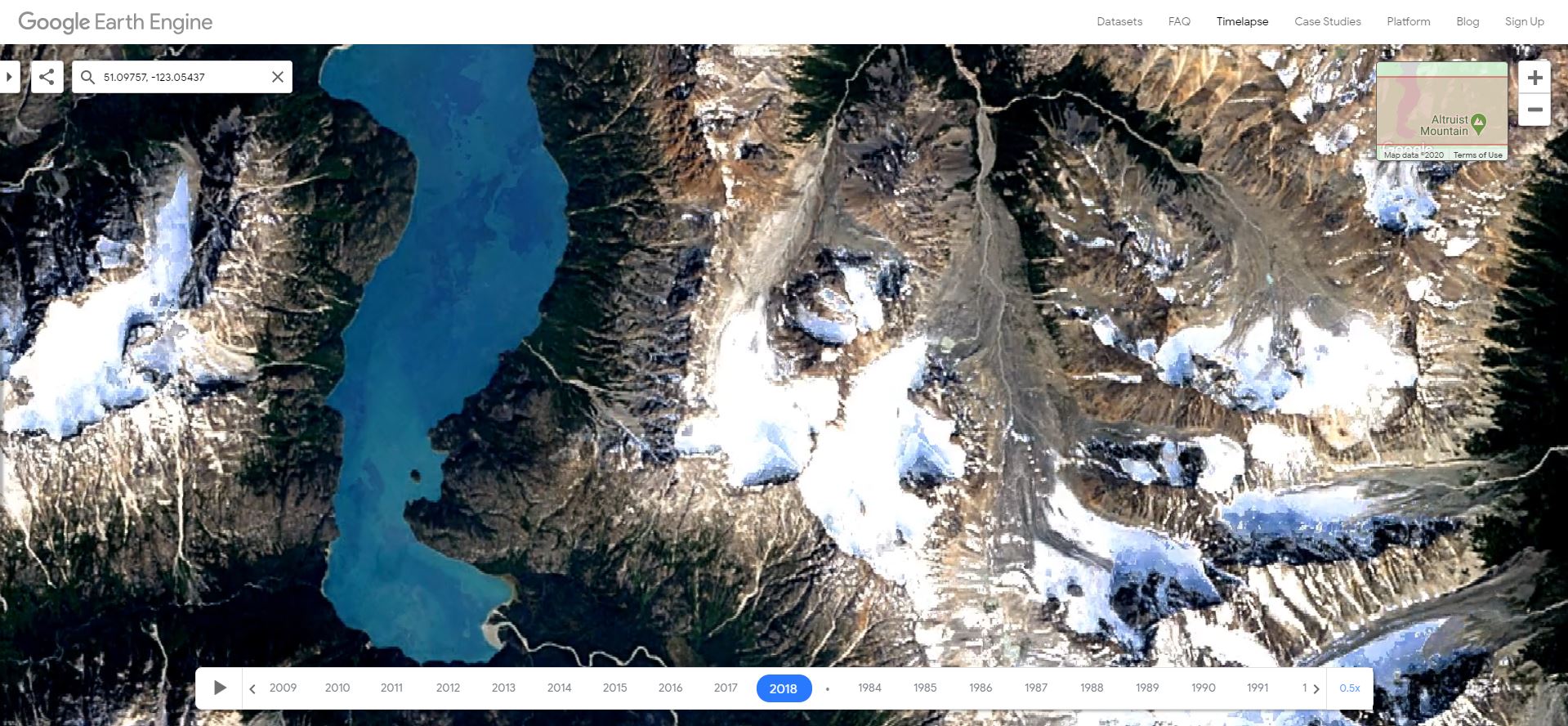
Step 2: Estimate the approximate location of the glacier toe in 1984 (creating a point feature and Figure EX2.3).
- Using landmarks visible in the earliest good imagery from Google Earth Engine Timelapse (this will most likely be 1984), add a point feature to your Google Earth project and move it to your best estimate of the location of the toe of the glacier in 1984. Use as many landmarks as possible to situate your point. Make sure your view is in 2D and it helps if you view both images at the same scale.
- For comparison, measure the length of the glacier you estimate in 1984 and create a screen capture of your measurement while the value of the measurement is still visible. Save this screen capture of Google Earth (Web) as <7_Lastname_1984_approximate_glacier_toe> (example provided as Figure 22.6).
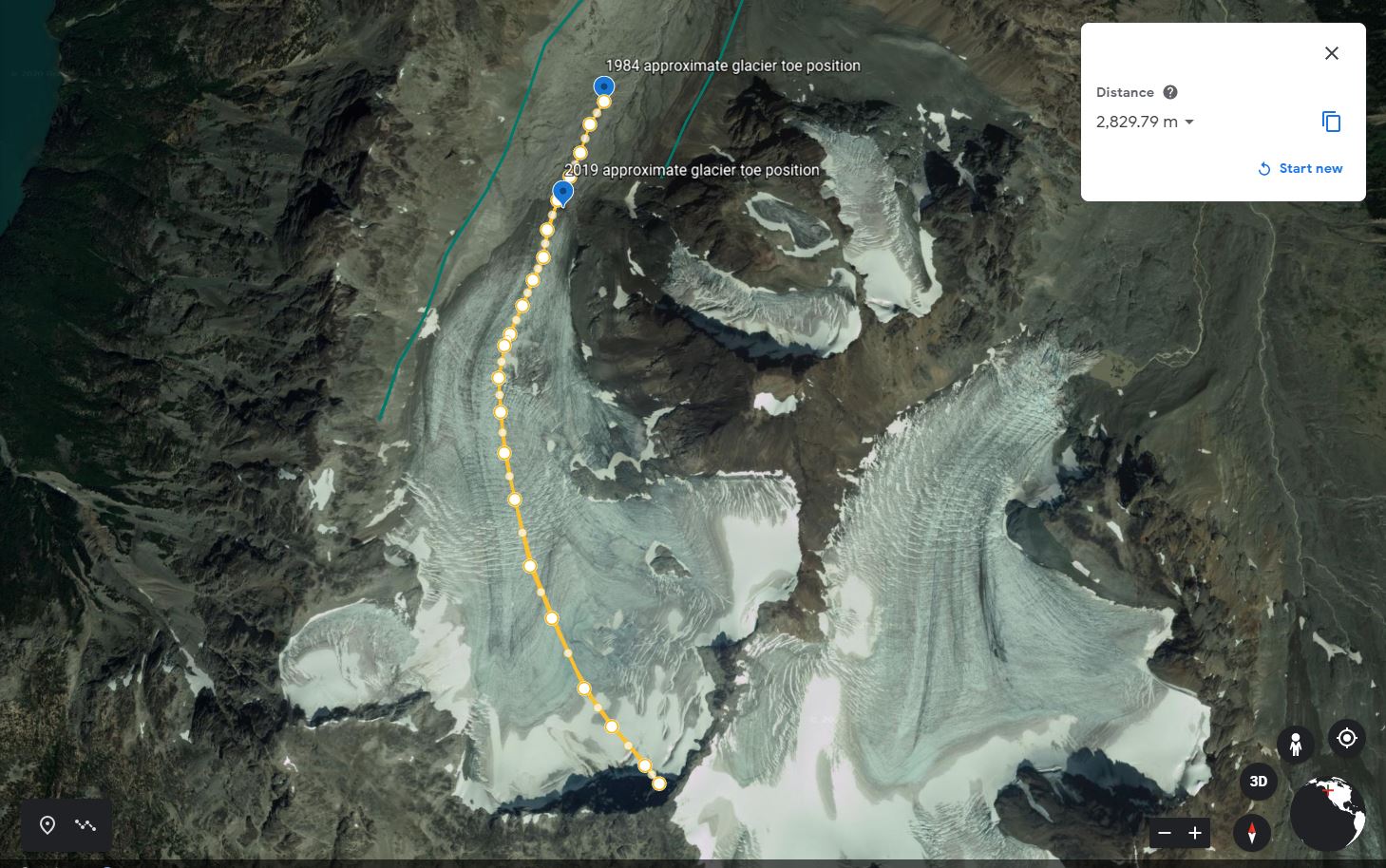
Step 3: Analyze the accumulation zone in the most recent satellite imagery (Figure EX2.4).
- Go to the USGS LandLook website tool for viewing recent satellite imagery and navigate to a large scale view of your glacier.
- View your chosen glacier by typing in the coordinates of your glacier or name of your glacier in the search pane (magnifying glass icon) and zoom in until the glacier fills a lot of your map area.
- Set the menu so that only Sentinel 2 MSI (2015-Present) displays by only having the box of this type of imagery set.
- In order to find the date of the best Sentinel 2 MSI (2015-present) image capturing the most recent size and pattern of the true accumulation zone, set the year to start from and extend to only the most recent year that there is 12 months of data. For instance, if you are doing this lab in Fall 2025, you will need to use the 2024 images.
- Modify the Days of the Year in the search pane so that results display the size and pattern of the true accumulation zone. This date coincides with the time of year when the size of the preserved snowpack from the previous winter will be at a minimum. Therefore, set the date range for your search to mid or late summer. For glaciers in low latitudes (southern and central BC or Alberta), set the Days of the Year from early August to late September. For glaciers in higher latitudes (Yukon, Nunavut and northern BC or Alberta) set the dates from early July to Late August. Video 22.2 provides instructions on how to do this.
Video 22.2. How to Search and Download Satellite Imagery. Real-time closed captioning and transcript are available on YouTube.
- Once the images are loaded (this might take some time), ensure that you turn the Dynamic Image Refresh off in the Image Display menu. Press the play button (black triangle) until you find the best scene depicting the minimum size of the accumulation zone. Press stop (black square) at this image. Record the image’s date (written directly below where it says Active Date in bold letters; e.g., August 27th, 2024).
- Using the Measure tool and then Location button (circle with a cross over it) record the geographic grid coordinates in decimal degrees of the glacier toe. Once you have clicked the location, the coordinate appears in a table beside the green placemark icon.
- Record the position.
- Create a screen capture of the glacier and save it in a file named <8_Lastname_daymonthyear_Sentinel_2_image>.
- Add this file to your document as Figure EX2.4 (refer to Figure 22.7 for an example) and indicate the image source by adding the URL of your current view. Do this by using the Bookmarks button then Generate URL button.
- Write a caption in which you describe and discuss the following questions:
a. What is the likelihood of the glacier disappearing in the current climate regime? Please refer to the visual evidence described in the lab introduction that supports your prediction.
b. What observations are you basing your hypothesis on? This involves describing the visual evidence you used.
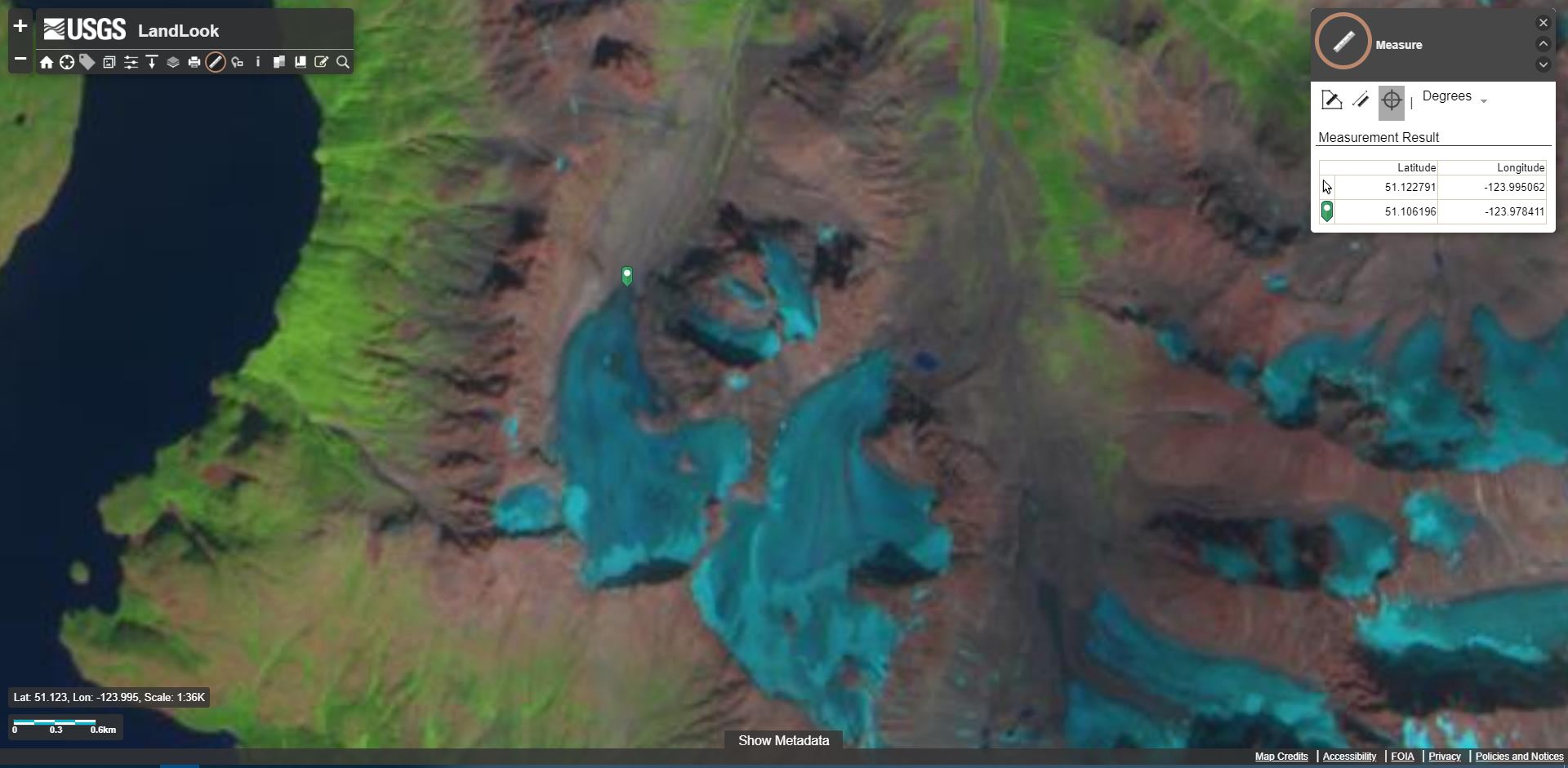
Step 4: Calculate the rate of change (Figure EX2.5).
- Using the coordinates recorded in the previous step, add a point to your Google Earth (Web) project called <Year approximate glacier toe position>. For example, 2024 approximate glacier toe position.
- Measure the distance between this location and the 1984 position and calculate the average rate of retreat or advance of the glacier. Take a screen capture of this measurement and save the measurement as <9_Lastname_glacier_position_measurement>. Add this image to your document as Figure EX2.5. An example is provided as Figure 22.8.
- Write a caption that includes the total measured retreat (or advance) distance over the period from your earliest photo until the most recent satellite imagery, and the average rate of retreat.
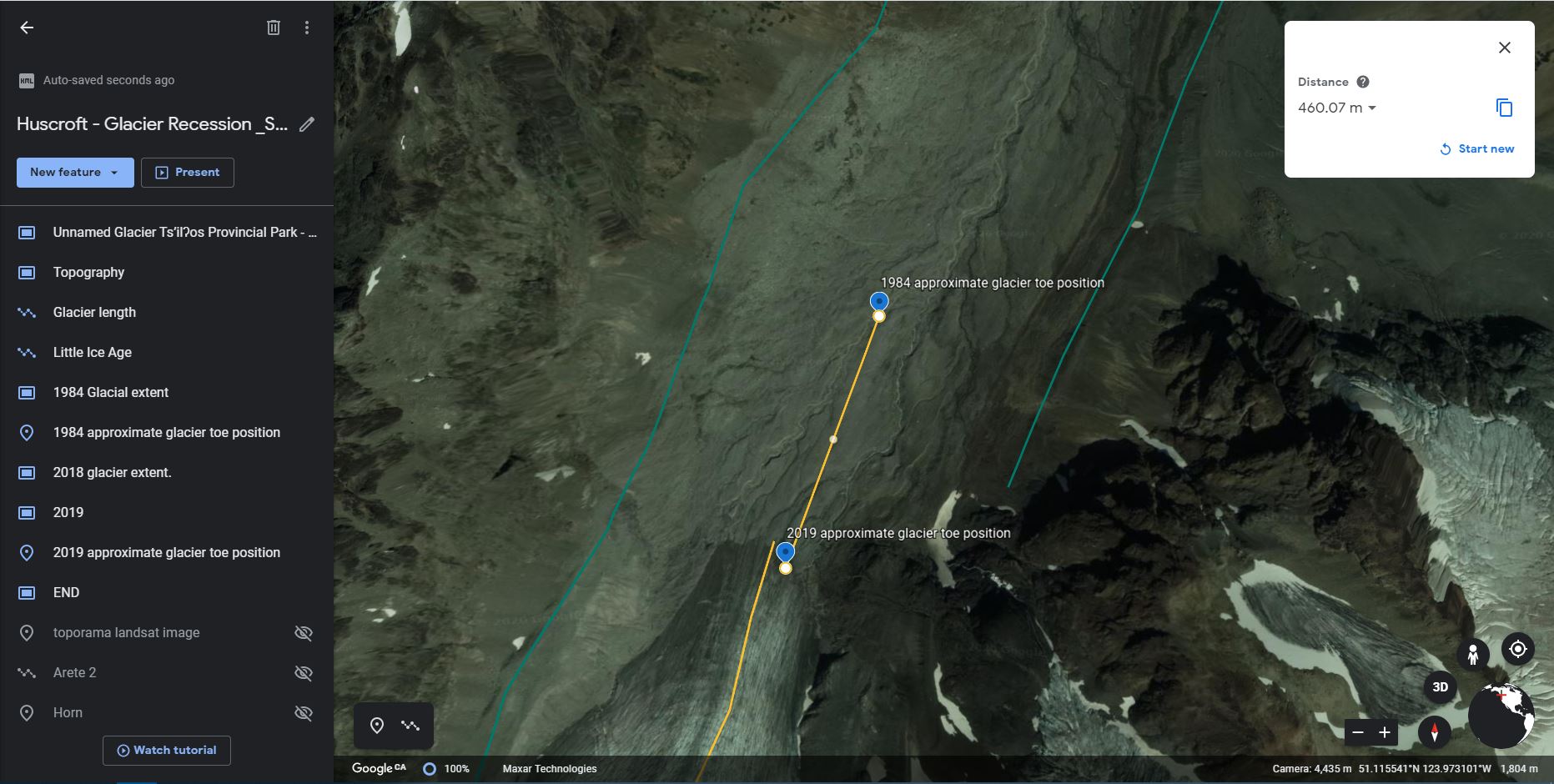
Step 5: Get curious and do a small scientific analysis of your own choosing.
- By exploring the tools and images available to you on the websites you have used so far in this lab, do an extra analysis of your own creation and add extra screen capture(s) as figure(s) that support your analysis as Figure EX2.6 (and additional if needed). Try to keep it as simple as possible. Be sure to state the question you are trying to answer in your analysis as well as your method. Possible analyses could involve:
-
- Doing an extra measurement.
- Accessing imagery from a different time and doing comparisons.
- Finding imagery on the The Atlas of Canada – Toporama website or the iMap BC website and comparing glacier toe positions.
Reflection Questions
- Which part of this activity did you like the most and why? Which did you like the least and why? In which section did you feel you learned the most about glaciers?
- In one paragraph, share your feelings about:
- Your discoveries in this lab in regard to the survival of your glacier.
- The fact that your classmates have probably come to similar conclusions with respect to other Canadian glaciers.
- How you felt being able to view historical images in order to come up with your own scientific conclusions about a glacier of your choice.
Report Submission
- Review your text for grammatical and spelling mistakes.
- Export your document to a PDF. Your PDF file needs to be a reasonable size (generally less than 5MB, but ask your lab instructor for details). In order to do this, you will need to reduce (compress) the file size of all of your images to between 150-100 ppi. Be sure to check that you have not compressed the images so much that you are not able to see them clearly on your monitor. For PC users, the compression can be done with MSWord by clicking on the image, choosing Picture Tools – Compress.
Submit as directed by your instructor.
Worksheets
Sample Student Assignment
References
GISGeography. (Last updated 2021, February 27). 5 Free Historical Imagery Viewers to Leap Back in the Past. https://gisgeography.com/free-historical-imagery-viewers/
Pelto, M. S. (2010). Forecasting temperate alpine glacier survival from accumulation zone observations. The Cryosphere 4, 67–75. https://doi.org/10.5194/tc-4-67-2010